Adobe Photoshop Lightroom Beta 2.0
Test drive the latest version of Lightroom for free (and risk-free - it runs alongside your current Lightroom installation and does not touch your existing Lightroom catalog):
Adobe Photoshop Lightroom Beta 2.0
I absolutely love Lightroom, and am looking forward to checking out the new features:
• Localized corrections — Enhance specific areas of an image for unsurpassed nondestructive flexibility and control reminiscent of the traditional darkroom dodge and burn experience.
• Improved organizational tools — Find the images you need quickly and easily.
• Multiple monitor support — Add an additional monitor to efficiently manage photographic workflow and presentation.
• Flexible print package functionality — Create custom layouts containing multiple sizes of a photograph on a single page.
• 64-bit support — Lightroom 2.0 now takes advantage of the latest hardware architectures with improved memory handling and performance.
by Shelly http://photon00b.blogspot.com
Showing posts with label Software. Show all posts
Showing posts with label Software. Show all posts
Thursday, April 3, 2008
Adobe Photoshop Lightroom Beta 2.0

Tuesday, April 1, 2008
Free E-book: Windows Server 2008 and Windows Power Shell scripting

This e-book includes excerpts from two recent publications from Microsoft Press: Introducing Windows Server 2008 by Mitch Tulloch with the Microsoft Windows Server Team (ISBN: 9780735624214):
This e-book covers Windows Server virtualization, managing Windows Server 2008, Active Directory, Terminal Services, and failover clustering. Microsoft Windows PowerShell Step by Step by Ed Wilson (ISBN: 9780735623958): This e-book includes an overview of Windows PowerShell, how to use Windows PowerShell cmdlets, and how to take advantage of PowerShell providers.
Additional chapters from Introducing Windows Server 2008 will be added periodically, so be sure to come back.
For more information: https://www.microsoft.com/learning/windowsserver2008/default.mspx
Free Support for Windows Vista SP1 Installation

For those who encounter problems when upgrade to Windows Vista SP1, here is a good news for you. Microsoft is giving away free support for Windows Vista SP1 issues. The unlimited installation and compatibility support is available at no charge until March 18. 2009.
There are 3 support options: Email, Online Chat and Phone. Currently, email support response time is 1 business day. Online chat waiting time is over 60 minutes(!). The phone support is only available for users who have software assurance agreement, TechNet/MSDN subscrition, or Microsoft Partner Program.
Oh, the free support is for U.S. users only. (duh!)
There are 3 support options: Email, Online Chat and Phone. Currently, email support response time is 1 business day. Online chat waiting time is over 60 minutes(!). The phone support is only available for users who have software assurance agreement, TechNet/MSDN subscrition, or Microsoft Partner Program.
Oh, the free support is for U.S. users only. (duh!)
Monday, March 31, 2008
Winamp 5.5.3.1924 Released
Winamp 5.5.3.1924 Released - Nullsoft Winamp is a fast, flexible, high-fidelity music player for Windows. Winamp supports MP3, CD, Audiosoft, Audio Explosion, MOD, WAV and other audio formats, custom appearances called skins, plus audio visualization and audio effect plug-ins. additional features including free-form skins, a new decoder, built-in cross fade, and an advanced Media Library
Main site: http://www.winamp.com/

Download player: http://www.winamp.com/player
- Improved: Different shell descriptions for different associated filetypes
- Improved: New 'Refine Search' feature in Cover Art Downloader dialog
- Improved: Unicode support for Language Packs incompatible with system locale
- Improved: [in_cdda] Now reads & writes CD data to an NDE database
- Improved: [in_cdda/ml_disc] Reimplementation of simple offline CD Info Editor
- Improved: [in_flac] Faster FLAC metadata gathering
- Improved: [in_mp3] More accurate .AAC length calculation
- Improved: [in_wav/in_mp4] Support for http streaming of files larger than 2GB
- Improved: [ml_disc] Added support for Data CD reading (w.i.p.)
- Improved: [ml_local/nde] Background scanning & database optimizations
- Improved: [ml_local] Unicode compliant filename-based metadata guessing
- Improved: [ml_transcode] Remove trailing periods from destination filepath
- Improved: [pmp_usb] Added AlbumArtist support to Naming Convention
- Fixed: Classic EQ appearing with Modern skins after switch->minimize->restore
- Fixed: Various miscellaneous Album Art related issues
- Fixed: [enc_lame] Now rejects multi-channel and above 48KHz source files
- Fixed: [gen_ff] Translated skin image loading
- Fixed: [gen_ml] Header sort arrow and Rating column display under Windows 2000
- Fixed: [gen_ml] Various drawing glitches when changing views
- Fixed: [in_cdda] CDDB crash under limited connectivity conditions
- Fixed: [in_cdda] Spectrum vis in analog MCI playback mode
- Fixed: [in_flac] Small memory leak when writing FLAC metadata
- Fixed: [in_flv] Last two seconds of flv videos being cut off
- Fixed: [in_mp3] Crash on encountering a bad ID3v2 version (e.g. ID3v2.F)
- Fixed: [in_mp4] Crash on file-not-found during background decode
- Fixed: [in_wave] Infinite loop on attempted repeat playback of dead files
- Fixed: [in_wm] ASX v2 loading
- Fixed: [in_wm] Crash on files & streams with a huge discontinuity jump
- Fixed: [in_wm / out_ds] Copy 'Status' to clipboard Unicode bug
- Fixed: [ml_autotag] Crash with certain tracks
- Fixed: [ml_history] Crash on drag+drop all history items to playlist
- Fixed: [ml_local] Rating of items with Unicode filenames
- Fixed: [ml_online/orb] Nodes dropping to bottom of ML tree on Lang Pack change
- Fixed: [ml_playlists] Play playlist from Media Library main menu item
- Fixed: [pmp_ipod] Filename length incompatibility with iPod Music Quiz v2
- Fixed: [pmp_ipod] Missing 'Advanced' button in Edit Query dialog
- Fixed: [pmp_ipod] Physical deletion of playing file
- Misc: Added Russian installer translation and language pack
- Misc: In2TV removed from Online Services
- Misc: Installer now built with NSIS Unicode version [thanks Jim Park]
- Misc: More miscellaneous general tweaks, improvements and optimizations
- Misc: Moved shared zlib.dll compression library out of winamp.exe
- Updated: Bento skin v1.1 #120
Avast! Anti-Virus 4.8.1169 Released
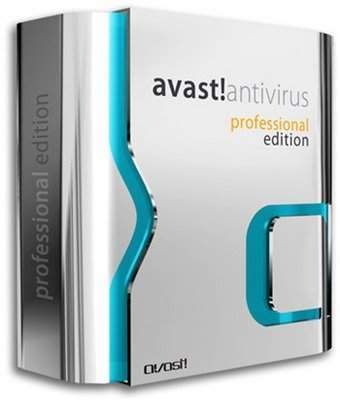
Avast! Anti-Virus 4.8.1169 Released - The immediate release of Avast! 4.8 Antivirus, in both Home Edition and Professional Edition variants. Avast! Antivirus 4.8 now has anti-spyware, anti-rootkit and strong self-protection
- avast! now contains a built-in anti-rootkit protection
- avast! now comes with a built-in anti-spyware protection
- new self-defense function to prevent active malware from terminating avast! processes as well as corrupting avast! files and registry items
- scanners now display a progress of current scan (percentage of work done)
- fixed a vulnerability in AavmKer4.sys kernel-mode driver (problem applies to Windows NT/2000/XP, 32-bit only); special thanks to Tobias Klein
- improvements in boot-time scanner (detection & removal of hidden or hard to delete files)
- boot-time scanner will not start when booting into Safe Mode (the program was "invisible" in that case, no progress/messages could be seen)
- improvements in many unpackers
- ACE and RAR unpackers now work even in boot-time scanner
- IM Shield: added support for QQ
- improvements in handling of NTFS streams
- Internet Mail provider now displays the name of the sending/receiving program in the tooltip of its taskbar icon
- implemented a protection against false positives in critical system files
- removed a small memory leak in one of avast! drivers (Windows Vista and XP 64-bit only)
- added support for 64-bit WHS connector (available in WHS Power Pack 1)
- greatly improved performance of the updater, especially in cases where many increments are - - being downloaded (e.g. avast! installations with outdated virus definitions)
- silent installation now also includes scheduled tasks, if any
- resolved a compatibility issue with Acronis TrueImage (XP 64-bit only)
- compatibility tests with Vista SP1 and XP SP3
- avast! now contains a built-in anti-rootkit protection
- avast! now comes with a built-in anti-spyware protection
- new self-defense function to prevent active malware from terminating avast! processes as well as corrupting avast! files and registry items
- scanners now display a progress of current scan (percentage of work done)
- fixed a vulnerability in AavmKer4.sys kernel-mode driver (problem applies to Windows NT/2000/XP, 32-bit only); special thanks to Tobias Klein
- improvements in boot-time scanner (detection & removal of hidden or hard to delete files)
- boot-time scanner will not start when booting into Safe Mode (the program was "invisible" in that case, no progress/messages could be seen)
- improvements in many unpackers
- ACE and RAR unpackers now work even in boot-time scanner
- IM Shield: added support for QQ
- improvements in handling of NTFS streams
- Internet Mail provider now displays the name of the sending/receiving program in the tooltip of its taskbar icon
- implemented a protection against false positives in critical system files
- removed a small memory leak in one of avast! drivers (Windows Vista and XP 64-bit only)
- added support for 64-bit WHS connector (available in WHS Power Pack 1)
- greatly improved performance of the updater, especially in cases where many increments are - - being downloaded (e.g. avast! installations with outdated virus definitions)
- silent installation now also includes scheduled tasks, if any
- resolved a compatibility issue with Acronis TrueImage (XP 64-bit only)
- compatibility tests with Vista SP1 and XP SP3
Thursday, March 27, 2008
Adobe Releases Photoshop Express as Free beta
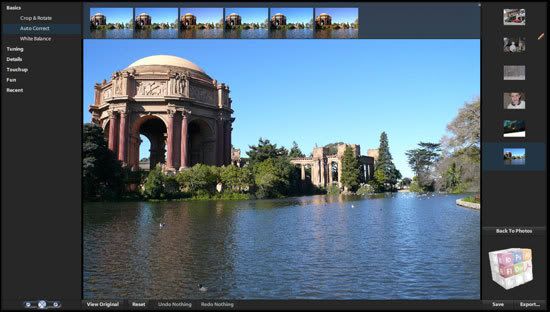
Now you could Crop, twirl, tweak, and share your pictures with the new Adobe Photoshop Express beta for free, all online. Photoshop Express allows you to store up 2 GB of images. It's going to be difficult for Adobe Photoshop Express because there is too many online image editors like Google Picasa, fotoflexer, splashup , and photobucket but what it counts is the experience which Adobe has.
More information: Adobe Photoshop Express
https://www.photoshop.com/express/landing.html
More information: Adobe Photoshop Express
https://www.photoshop.com/express/landing.html
Portable Edition of Mozilla Firefox 2.0.0.13 Released

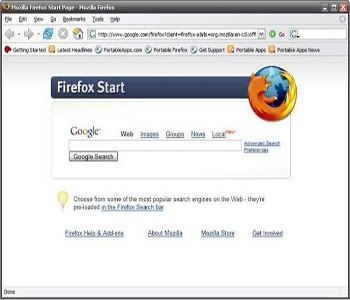
 Freeware :: Portable Edition of Mozilla Firefox version 2.0.0.13 has been released. Now you can take your browser, bookmarks, feeds, extensions and settings on the go. This new release updates the included Firefox to 2.0.0.13 fixing some security and stability issues and updates the included launcher.
File size: ~25 MB
System Requirements: Windows 98/Me/2000/XP/Vista, Wine on Linux/UNIX
completely free. What are you waiting for? Go forth and download
For more information Portable Mozilla Firefox Edition
Tuesday, March 25, 2008
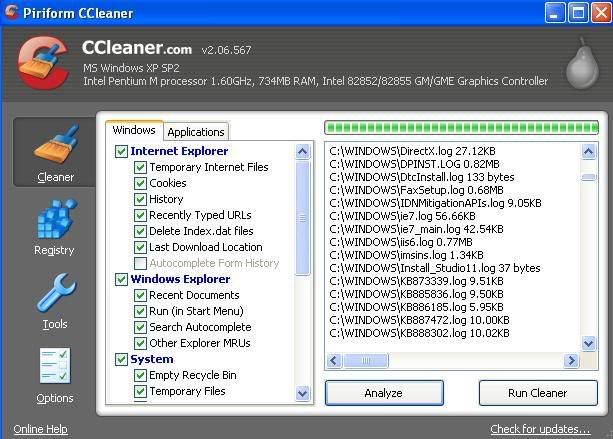
New version of CCleaner 2.06.567
New version of CCleaner 2.06.567. Ccleaner is a freeware system optimization tool. It removes unused files from your computer.
What's new :: v2.06.567
---------------------------------------------
- Added Google Firefox Toolbar history cleaning.
- Winapp.ini is now embedded in the main EXE.
- Added ability to override default embedded INI files with: winsys1.ini, winreg1.ini and winapp1.ini.
- Updated ability to append to default embedded INI files with: winsys2.ini, winreg2.ini and winapp2.ini.
- Updated system info code to support Win2k8.
- Improved IE History cleaning with .DAT files.
- Improved accessibility features of treeview control.
- Removal of version history from About screen.
- Options section checkboxes resized to fit caption text.
- GUI tweaks including Piriform logo change.
- Minor performance improvements.
Visit: http://www.ccleaner.com
Subscribe to:
Posts (Atom)